

If you run a small business, you have probably asked yourself this question: "Why should I pay a designer when I can make a post in Canva in ten minutes?" It is a fair question. Canva is easy, affordable, and has made design possible for people who never touched a design tool before.
But easy and effective are not always the same thing. In this guide, we give you an honest comparison. We will show you where Canva works well, where it starts to hurt your brand, and how to decide which one is right for your business right now.
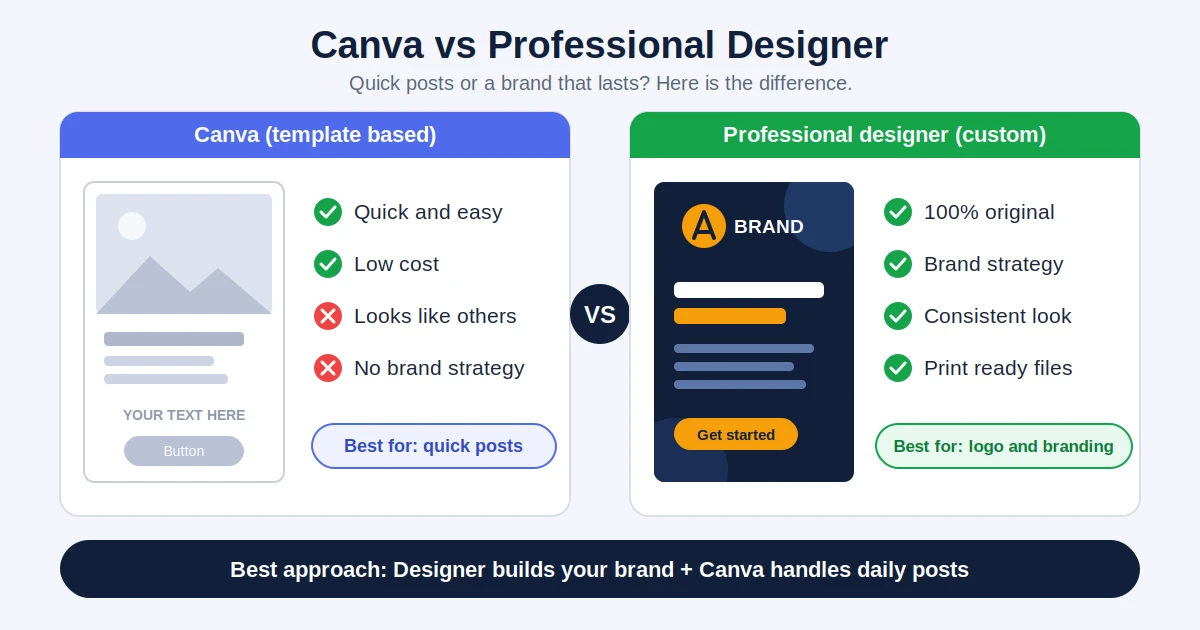
Let us give credit where it is due. Canva is a great tool, and many businesses use it successfully every day. Here is where it shines:
For quick, everyday content, Canva is genuinely useful. The trouble starts when it is used for things it was never meant to do.
The same features that make Canva easy also create its biggest weaknesses.
1. Your design looks like everyone else's. Thousands of businesses pick from the same templates. A customer who scrolls through Instagram may see a very similar layout from your competitor, a salon in another city, and a coaching centre next door. When your design looks familiar, your brand is not memorable.
2. There is no real brand strategy. A template cannot ask who your customers are, what makes you different, or what feeling your brand should create. It only fills a space. Professional design starts with those questions, and the answers shape every colour, font, and layout choice.
3. Inconsistency creeps in. When different people make posts at different times using different templates, your brand slowly starts to look like five different businesses. That inconsistency reduces trust, even if each single post looks fine.
4. Logo and ownership concerns. Logos built from template graphics or stock elements can be hard to protect, and the same elements may appear in other brands. Always read the licence terms before using any template-based design for your main logo or for anything you plan to trademark.
5. Limited print and file flexibility. Large banners, packaging, and professional printing often need properly prepared vector files and exact colour settings. Template tools can be limiting here.
A designer is not just someone who knows software. They bring thinking, research, and experience that a tool cannot offer.
A good designer also understands psychology, such as how colours affect trust and buying. Our guide on how color psychology influences branding shows how much thought goes into even a simple colour choice.
You do not always need to hire a designer. Canva is a sensible choice when:
In these situations, spending more on custom design may not give you a return that is worth it.
It is time to bring in a professional when:
Here is what many successful small businesses do. They do not choose one or the other. They use each for what it does best.
First, hire a professional designer to create the brand foundation: logo, colour palette, fonts, and a few key templates. Then, have your designer set up those brand colours and fonts inside Canva. Now your team can create day-to-day posts quickly, and everything still looks consistent and professional.
This approach gives you the quality of professional branding with the speed and low cost of a simple tool. It is also a good way to stay flexible as new design styles come and go, which we explore in our overview of graphic design trends in 2026.
AI tools are now part of this conversation too. They can speed up ideas and rough drafts, but they bring their own limits around originality, consistency, and control. If you are weighing that option as well, read our comparison of AI graphic design vs traditional graphic design.
For simple, everyday content like social media posts and quick offers, yes. For your logo, brand identity, packaging, and important marketing materials, a professional designer usually gives much better and longer-lasting results.
You can, but it is risky. Template-based logos may look similar to other brands and can be difficult to protect legally. Check the licence terms carefully, and consider a custom logo if you want a brand you can own and grow.
It costs more upfront than a template tool, but a good design lasts for years and avoids the cost of redoing logos, reprinting materials, and fixing inconsistent branding. Many designers also offer packages that suit small businesses.
Yes, and it is often the best approach. Let a designer create your brand foundation, then use Canva with your brand colours and fonts for quick, day-to-day content.
If your business is growing, your designs look like your competitors', your branding feels inconsistent, or you are preparing for print and packaging, it is time to invest in a professional designer.
Canva and professional designers are not enemies. Canva is a handy tool for quick, simple content, while a designer builds the identity that makes people recognise and trust your business. The best choice depends on where your business is today and where you want it to go.
If you are ready to build a brand that stands out, the design team at Alien Web Solutions can help you with logo design, brand identity, and graphics that work across print and digital. Get in touch and tell us about your business.