

Many people launch a Shopify store, upload their products, share the link on Instagram, and then wait for Google traffic to arrive. Weeks pass, and nothing happens. The usual reason is a common myth: "Shopify is SEO-friendly, so my store will rank on its own."
Shopify does give you a good start. But a good start is not the same as good rankings. Two stores on the same platform can get very different results, depending on how they handle their collection pages, product pages, images, speed, and trust. In this guide, we explain what Shopify does for you, what you need to do yourself, and a simple step-by-step plan to get your store found.
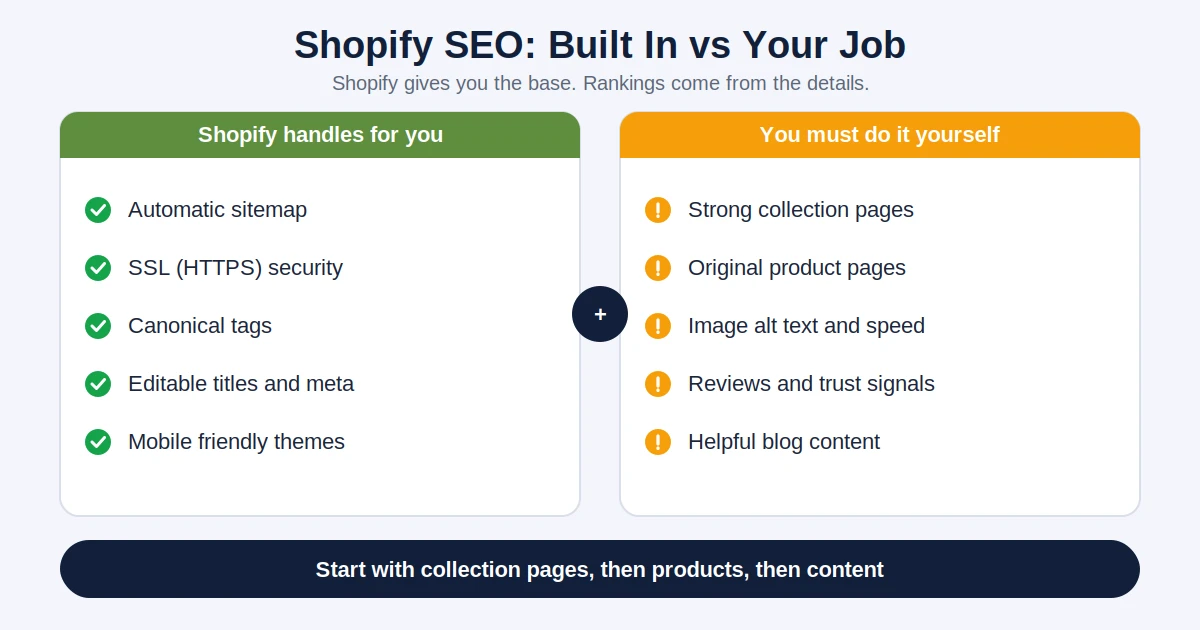
Shopify handles several technical basics so you do not need a developer for them. According to Shopify's own documentation, online stores have SEO features built in. In practice, this usually includes:
This is helpful, but it only covers the technical foundation. The things that actually make people choose your page, like good titles, useful descriptions, strong collection pages, and trust, are still your job.
Before you work on any page, get the basics right:
Do not just chase big keywords. Think about what a buyer types at each stage:
Match each type of search to the right page. Browsing and ready-to-buy searches usually belong on collection and product pages. Comparing searches fit well as blog posts. Also listen to how your customers actually speak. For Indian stores, that often includes simple English, Hinglish, and local words, so check your WhatsApp chats and customer questions for real phrases.
This is where many stores lose easy wins. Collection pages, such as "Women's Sandals" or "Wooden Toys", often match the exact searches people make. Yet many stores leave them with only a title and a grid of products.
How to improve them:
Product pages are where a visitor decides to buy, and where many stores copy text straight from the supplier. If hundreds of stores use the same description, you give Google no reason to prefer yours.
These problems are common on Shopify stores, and most are easy to fix once you know about them:
A blog on your Shopify store is not just for decoration. It lets you reach people who are still researching, before they are ready to buy. Good topics include buying guides, comparisons, how-to articles, and care instructions for your products.
Each blog post should link to the relevant products and collections, so readers can move naturally from learning to buying. Shopify also has its own Shopify SEO guide if you want another perspective on the basics.
More shoppers now ask AI tools for product suggestions before they ever visit a store. These tools tend to favour brands that are clear, consistent, and trusted across the web. For a Shopify store, that means:
To understand this shift in more detail, read our guides on how to optimize content for AI search, GEO vs SEO, and entity SEO. Your store can also be found beyond Google, which we cover in our article on search everywhere optimization.
After the first month, look at which pages gained impressions and clicks, and repeat the same approach on more pages.
Both platforms can rank well when they are set up properly. Shopify is easier and has more built in, while WooCommerce offers more flexibility and control. The right choice depends on your budget, skills, and plans. We compare them in detail in our article on WooCommerce vs Shopify.
Yes, Shopify has a solid technical base, including an automatic sitemap, SSL, and editable titles and descriptions. But good rankings still depend on your content, product pages, speed, and trust, which you need to work on yourself.
Small improvements can appear in a few weeks, but steady growth in traffic and sales usually takes a few months. New stores often need more time because they have no history or reviews yet.
Not always. You can handle titles, descriptions, alt text, and redirects without an app. An app can help with bulk edits or audits, but each app adds code, so install only what you really need.
It is a good idea if you do it with purpose. Helpful guides and comparisons attract people who are still researching and can lead them to your products. Focus on quality and relevance, not on posting often.
Make your product information clear and complete, collect genuine reviews, keep your brand details consistent across the web, and answer common questions on your pages. These steps make it easier for both search engines and AI tools to understand and trust your store.
Shopify takes care of the technical basics, but ranking is earned through the details: strong collection pages, original product pages, a fast store, helpful content, and real trust signals. Start with the foundations, improve your most important pages first, and keep going steadily.
If you want help building or improving a Shopify store that attracts customers and turns them into buyers, the team at Alien Web Solutions is ready to help. Tell us about your products and goals, and we will suggest a practical plan.